Custom UI Actions
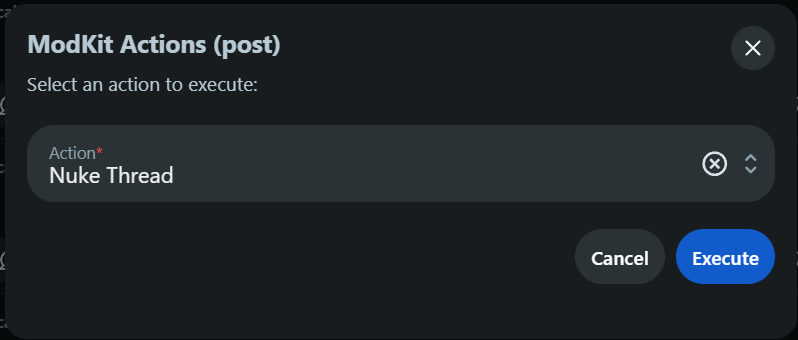
Custom UI Actions allow moderators to manually execute complex, predefined moderation workflows on demand. Instead of creating a cluttered menu, Modegator injects a single master "🛡️ MG Actions" button into the native Reddit interface for posts and comments. Clicking this button opens a quick-action form with a dropdown to select your desired UI Action.
UI Action Structure
A UI Action is defined in the ui_actions array. It must include a name, label (what appears in the dropdown menu), and the location where the action should be available.
The supported locations are post or comment. (Subreddit actions are reserved for accessing the dashboard).
Basic Execution
When a moderator selects an action from the dropdown and clicks Execute, Modegator instantly runs the defined actions.
ui_actions:
  - name: "Nuke Thread"
    label: "Nuke Thread"
    location: "post"
    actions:
      - type: "remove_post"
      - type: "lock_post"
      - type: "submit_comment"
        text: "This thread has been nuked."
        sticky: true
In this example, when a moderator clicks the "🛡️ MG Actions" button on a post, a modal will appear. If they select "Nuke Thread" from the dropdown and click Execute, it will instantly trigger the removal workflow against that specific post.
Form-Based Input Execution
Sometimes you need to prompt the moderator for data at runtime. While native complex forms are not natively supported by basic UI action config right now, you can pass hardcoded parameters or execute predefined actions.
ui_actions:
  - name: "Custom Ban User"
    label: "Custom Ban"
    location: "post"
    actions:
      - type: "ban_user"
        duration: 7
        reason: "Spam behavior"
        message: "You have been banned for 7 days."
How to Execute a UI Action
To execute your configured UI actions in the native Reddit app or website, follow this workflow:
-
Open Mod Actions: Click the Shield Icon on any post or comment to open the native Reddit Mod Actions menu.

-
Launch Modegator: In that menu, click on the 🛡️ MG Actions button.

-
Select Your Action: A modal will appear. Select the specific UI action you want to run from the dropdown menu, then click Execute.