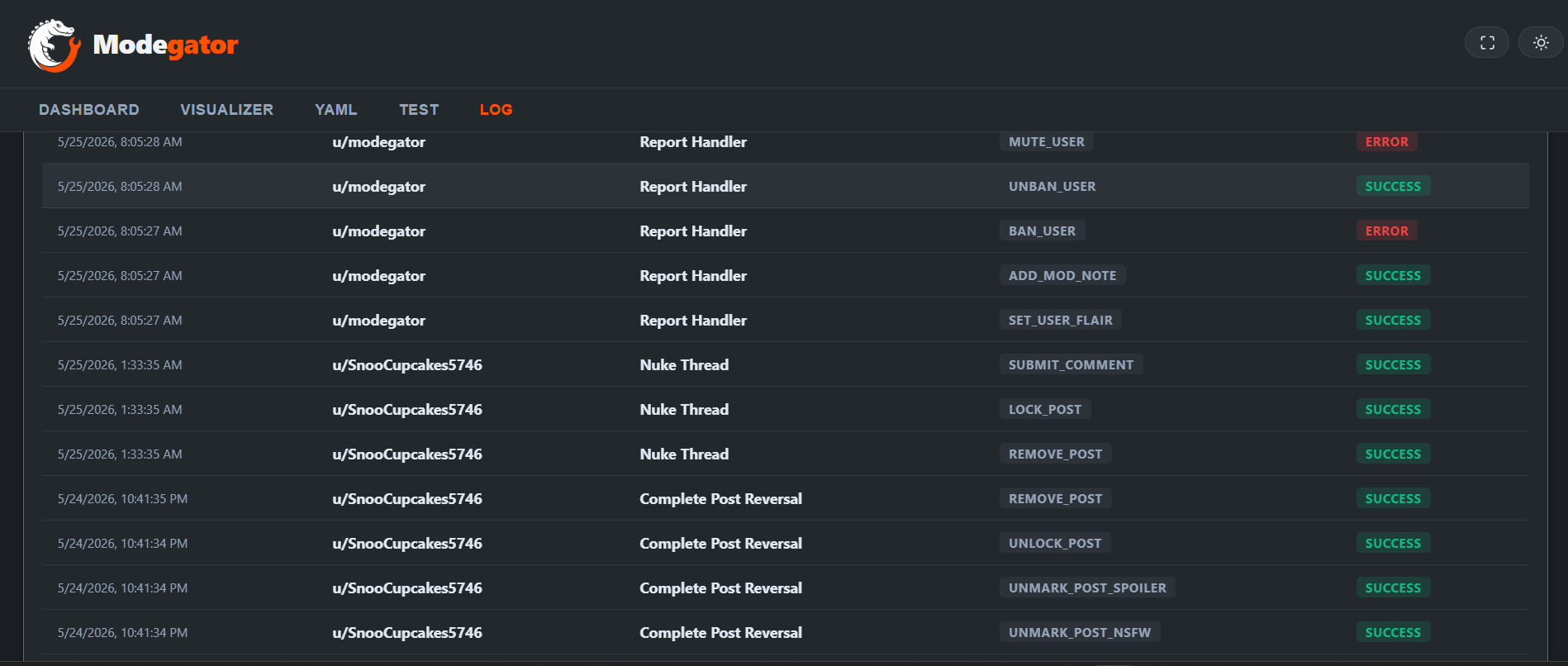
Action Logs
Visibility and accountability are crucial for any moderation team. Modegator provides comprehensive Action Logs to track every automated decision and manual UI Action taken by the system.
Viewing the Logs
Navigate to the Logs tab in the Modegator Dashboard.
The logs view presents a chronological timeline of all executions performed by Modegator. These logs are stored securely in the subreddit's dedicated Redis instance.
What is Logged?
For every execution, Modegator records:
- Timestamp: Exactly when the action occurred.
- Trigger Source: What caused the action (e.g., an automated
PostSubmitrule, a Scheduled Task, or a manual UI Action triggered by a specific moderator). - Target Context: The ID of the post, comment, or user that was acted upon.
- Actions Taken: A detailed list of the moderation actions executed (e.g.,
remove,lock,ban_user). - Form Data (If Applicable): If a Custom UI Action involved a form, the inputs provided by the moderator are preserved in the log.
Auditing and Troubleshooting
Action Logs are essential for troubleshooting automated rules. If a user complains about an unfair removal, you can quickly scan the logs to see exactly which rule fired, what conditions were met, and whether an automated process or a manual macro triggered the action.
Note: Modegator relies on Redis for log storage. To prevent storage limits from being reached, older logs may eventually be rotated or pruned depending on the volume of moderation activity in your subreddit.